

Tight construction timelines and aging building stock have made accurate existing-condition modeling a non-negotiable step in AEC workflows. Scan to BIM enables teams to convert real-world building geometry into coordinated digital models that support renovation planning, design validation, and construction sequencing. This process plays a strategic role in minimizing risk, reducing rework, and ensuring that decisions are grounded in actual site conditions.
Many renovation and retrofit projects begin without updated as-built drawings or spatial documentation. For architects and engineers, that gap translates to uncertainty during design development and downstream coordination. Matterport Scan to BIM addresses this by delivering verified 3D models that accurately reflect architectural layouts, structural elements, and MEP components, all tailored to the project’s required Level of Detail.
Matterport has gained traction among BIM professionals for its ability to quickly document interior environments and generate visually rich, navigable datasets. Effective in occupied or confined spaces, Matterport scanning supports faster turnarounds and provides a shared visual reference for technical and non-technical stakeholders alike. BIM teams now rely on this method as a fast-start input for accurate, scope-aligned modeling on interior-driven AEC projects.
Understanding Scan to BIM
Scan to BIM is about capturing building geometry and creating a data-rich model that supports decisions from pre-construction through handover. For AEC professionals, it enables digital coordination based on verified site conditions, particularly when dealing with undocumented spaces, outdated drawings, or projects requiring phased demolition and reconstruction. The value lies in aligning field reality with virtual planning, where even minor dimensional errors can lead to major rework or system clashes.
BIM experts choose between laser scanning and photogrammetry depending on site constraints, tolerance needs, and project phase. Laser scanners are used where structural tolerances demand millimeter precision, such as steel retrofit or load-path modifications. Matterport and similar photogrammetry tools are often preferred in fast-paced interior scopes like healthcare renovations, hospitality fit-outs, or facility repurposing, where speed, access, and stakeholder visualization are more critical than sub-centimeter accuracy. The decision involves selecting data collection and matching capture methods that align with modeling intent and construction risk.

What is Matterport and How It Works
Matterport is a site capture tool that Scan to BIM teams use for rapid interior documentation particularly in renovation and retrofit projects where speed, access, and visual clarity matter more than survey-grade tolerances. Instead of relying on laser triangulation, Matterport uses structured light and photogrammetry to create navigable 3D environments and exportable data sets. It’s especially effective in scenarios where traditional laser setups are time-consuming or impractical, such as working in active hospitals, hotels, or commercial spaces that remain operational during scanning.
Key features include:
- Structured-light capture with automated alignment for confined or irregular layouts
- MatterPak export bundle with point cloud (XYZ), OBJ mesh, and 2D floor plan assets
- E57 format support for integration into Revit and other BIM platforms
- Web-based 3D walkthroughs usable for client approvals and design reviews
- Minimal operator input ideal for field teams with tight access windows
- High scan speed per position suited for occupied or cluttered interior sites
By combining panoramic visuals with usable point cloud data, Matterport enables a fast-start workflow for BIM teams working on tight schedules or within active building environments. It allows modelers and project stakeholders to work from a visually rich, spatially accurate reference ideal for tenant fit-outs, adaptive reuse, and interior asset modeling where traditional scanning might be cost- or time-prohibitive.

Why Matterport is Chosen for Built Environment Projects
Matterport is frequently deployed in interior scopes where ceiling height variations, corridor density, and occupied zones limit the feasibility of tripod-based laser scanning. BIM professionals use it in phased renovation projects, healthcare upgrades, and retail expansions where scanning time is limited to off-hours or brief shutdown windows. The Pro3 camera, in particular, allows rapid multi-room capture with positional tracking, reducing the need for resection or manual registration. Its lightweight setup avoids disruption in operational buildings, making it a go-to for live sites that cannot accommodate high-end survey equipment.
What sets Matterport apart for BIM use is speed and how it aligns with modeling logic in Revit or ArchiCAD. Unlike raw LiDAR, Matterport provides colorized spatial context, allowing BIM teams to distinguish material boundaries, architectural finishes, and ceiling obstructions with greater visual confidence. This proves useful in capturing complex conditions like soffits, partition offsets, or non-uniform MEP concealments that are common in retrofits. For contractors managing build-outs in legacy structures or confined vertical cores, Matterport provides a reliable way to collect verified geometry without full shutdowns or re-scans.
Scan to BIM Workflow Using Matterport
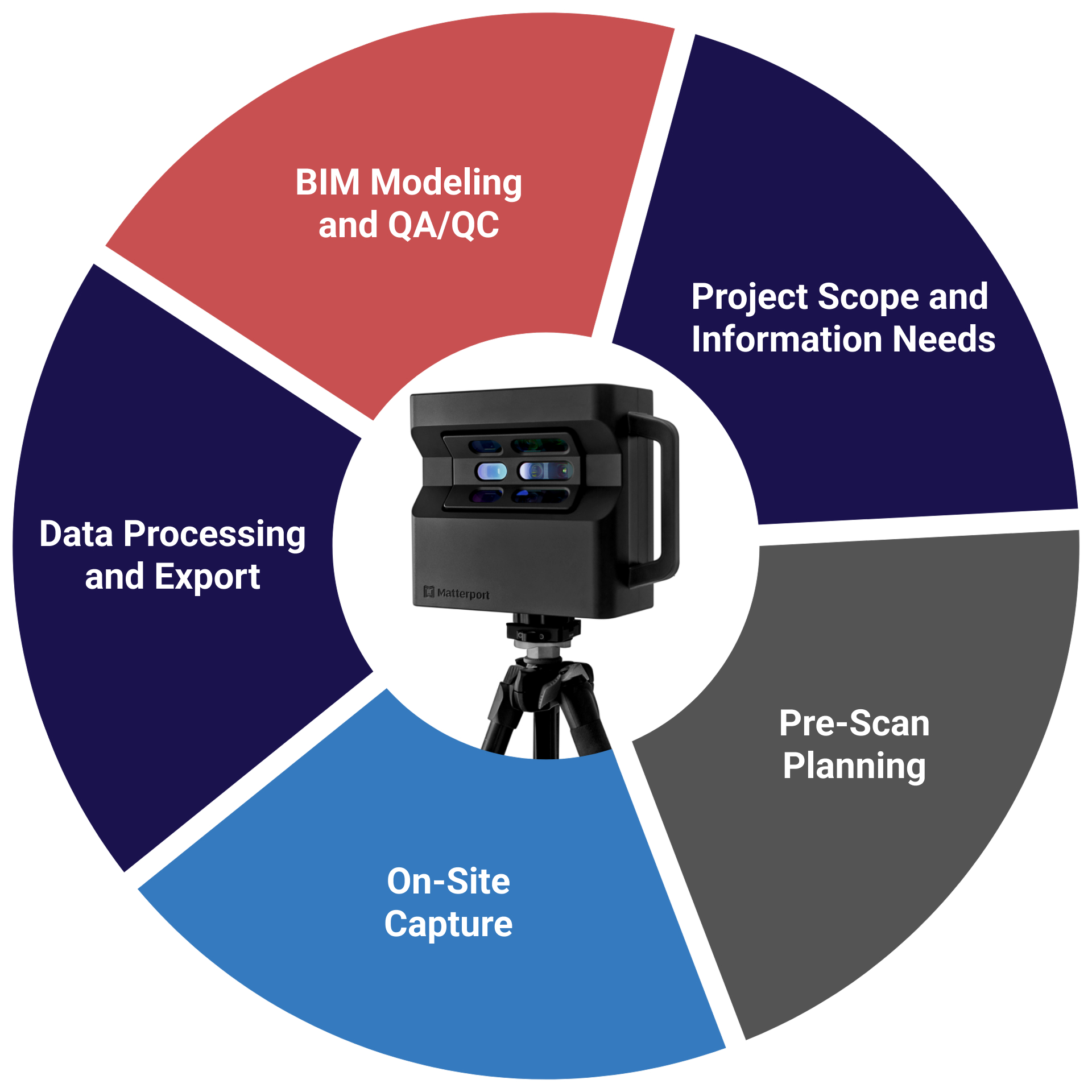
Project Scope and Information Needs
Professional teams start by aligning capture intent with project phase—whether it’s for demolition planning, interior fit-out, or facilities turnover. LOD targets are defined based on what elements must be modeled like wall layers, ceiling voids, and exposed MEP, avoiding unnecessary detail that inflates cost or delays turnaround.
Pre-Scan Planning
Site constraints such as fire doors, active patient zones, or security restrictions are flagged early. Technicians plan the scan path to ensure full coverage across split levels, deep corridors, or irregular room layouts, while minimizing blind spots that typically require return visits.
On-Site Capture
Technicians use the Matterport Pro3 to rapidly capture multiple scan points across zones such as back-of-house ducts, restroom cores, and equipment rooms. Each scan is geospatially stitched in real time, reducing the need for post-scan registration. High-traffic or semi-occupied zones are prioritized first to match access windows.
Data Processing and Export
After cloud processing, E57 or MatterPak data is exported. Teams remove redundant scan points, adjust alignment for stairwells or vertical shafts, and convert files for Revit integration. If higher precision is required, Matterport data is aligned with LiDAR-based scans using Autodesk ReCap or CloudCompare.
BIM Modeling and QA/QC
Modelers reconstruct architectural geometry including irregular partitions, non-uniform ceilings, and exposed MEP drops, directly over the point cloud. QA involves visual comparison between Matterport imagery and BIM geometry to validate accuracy, supplemented by manual checks in areas prone to distortion, such as mirrored surfaces or glass-heavy spaces.
Advantages of Using Matterport in Scan to BIM
- Allows fast capture in heavily partitioned interiors like hospitals, schools, and data centers where traditional LiDAR is inefficient
- Ideal for documenting ceiling voids, equipment rooms, and corridor runs where ceiling tiles or fixtures are still in place
- Simplifies early-phase documentation when access is limited to short time slots night shifts, weekends, or live facility conditions
- Reduces reliance on engineering teams for initial field capture; trained site staff or subcontractors can handle scanning
- Provides scan-based references for modeling complex soffits, sloped walls, and non-modular layouts often missed in 2D surveys
- Creates immersive, traceable site records used in handover packages or post-occupancy FM audits
- Helps resolve RFI disputes by offering visual evidence of pre-existing conditions, even before demo or enabling works
- Enables low-disruption re-scanning for progress tracking or scope changes during phased construction
- Scan to model workflows in hybrid projects where only select zones require high-accuracy laser data
- Supports condition-based asset tagging and visual punch lists directly linked to BIM sheets via web walkthroughs
Limitations and How Experts Manage Them
| Practical Limitation in AEC Projects | How Experts Manage It |
| Matterport lacks reliable accuracy for detailed ceiling grid or embedded MEP coordination | MEP-heavy zones scanned separately with LiDAR and merged in ReCap or Navisworks with control points |
| Reflections from polished floors, glass partitions, or stainless equipment cause scan warping | Teams mask or bypass highly reflective surfaces, then manually reconstruct geometry in modeling phase |
| Scan stitching errors in long corridors or repetitive layouts (e.g., hotel rooms, clinics) | Insert additional scans with tighter intervals to anchor alignment; verify spatial logic during QA/QC |
| No native coordinate system alignment to project grid or site datum | Point cloud is re-geolocated using benchmarks, total station points, or reference Revit views |
| Cloud-only processing limits real-time scan validation on secured job sites | Teams use low-res previews on-site; export assets as soon as processing completes for offline use |
| Not viable for exterior facades or multistory envelope documentation | Façade scans handled via drone or LiDAR; Matterport limited to interior envelope up to sill/soffit |
| Scan shadows and occlusion in cluttered areas (storerooms, server closets, under stairs) | Multiple angled scans inserted; missed geometry flagged for modeling assumptions with documentation |
| Difficult to capture narrow risers, utility shafts, or plenum zones | Used only for base geometry in these areas; critical routing modeled using laser scan or redline input |
| Not accepted for contractual deliverables needing verified tolerances | Used as visual reference only; deliverable models built from control-based point clouds where needed |
Integration with BIM and Project Management Platforms
Matterport data integrates smoothly into BIM and project management platforms, allowing teams to visual coordination, site documentation, and stakeholder communication. Experts often embed 3D walkthrough links into Revit sheets, BIM 360 dashboards, or Navisworks models to provide visual context alongside model geometry during coordination and clash resolution. Orthophotos and floor plans derived from Matterport scans enhance drawing accuracy, while MatterPak files supply mesh and point cloud data for as-built modeling or layout verification. Teams use these integrations to enrich RFIs, progress reports, and facility documentation, enabling faster approvals and reducing reliance on manual site visits. This alignment between scan data and digital workflows supports better-informed decisions throughout the project lifecycle.
Common Use Cases for Matterport-Based Scan to BIM
- Interior Renovation Projects
- Commercial Fit-Outs
- Historical Building Documentation
- Facility Condition Assessments
- MEP Retrofit Planning
- Asset Inventory and Space Tagging
- Digital Twin for Facility Management
- Real Estate Marketing and Handover
- Insurance and Claims Documentation
- Construction Progress Snapshots
Best Practices for Matterport Scan to BIM Projects (Refined)
- Align Matterport scanning strategy with project-specific deliverables such as COBie sheets, FM handoff, or MEP zone extraction
- Integrate control points from total stations to tighten registration accuracy for hybrid modeling
- Use Matterport scans to flag inaccessible zones early and assign LiDAR or drone-based follow-ups
- Standardize scan metadata naming aligned with drawing zones or room numbering conventions
- Export Matterport orthophotos for use in CAD overlays during clash-driven redesigns
- Tag equipment or service panels during the scan for downstream asset tagging in CMMS
- Validate scan geometry with partial manual verification on-site for tolerance compliance
- Embed Matterport links directly into model sheets for design team review and walkthrough-based redlining
- Calibrate MatterPak E57 files before merging with high-precision point clouds in Autodesk ReCap
- Schedule Matterport scans to align with phasing plans in fast-track interior fit-outs
Latest Software and Technologies Supporting Scan to BIM
Advancements in workflows are increasingly supported by software tools that enhance accuracy, automation, and interoperability. Autodesk ReCap and ArchiCAD continue to serve as foundational platforms for importing MatterPak or E57 outputs, while plug-ins for Revit streamline point cloud conversion into parametric BIM elements. AI-assisted tools like Veriscian and BricsCAD BIM are being adopted to semi-automate model generation from scan data, particularly for repetitive architectural components. For hybrid workflows, Leica Cyclone and NavVis IVION provide integration capabilities that align Matterport data with terrestrial LiDAR. Cloud platforms such as BIM 360 allow teams to embed walkthroughs directly in coordination models, creating a more collaborative review experience. Mobile scanning apps are also improving, enabling quick supplementary captures to complement Matterport’s broader interior scans.
Conclusion
Matterport has become a strategic tool in Scan to BIM workflows, for interior-heavy, fast-paced AEC projects where speed, accessibility, and visual clarity matter. When used by BIM experts who understand its strengths and geometric limits, Matterport delivers fast, photorealistic as-built data that accelerates modeling, design coordination, and client communication. Rather than replacing survey-grade tools, it complements them offering an efficient starting point for modeling, in occupied or complex indoor spaces. The key to value lies in deploying Matterport selectively within hybrid workflows and aligning its outputs with precise modeling goals and BIM deliverables.


Recent Comments